Where Do You Find Current Skool Discovery Rankings? A Step-by-Step Guide
If you have been searching for where do you find current Skool Discovery ranking, you are not alone. Many community owners struggle to locate this information. This guide will show you exactly how to find your Skool community Discovery ranking in just a few simple steps.
Understanding your Skool community rank is essential for growing your audience. Your ranking determines how visible your community is when potential members search for topics related to your niche. The higher your rank, the more discoverable your community becomes.
While Skool does not make rankings obvious, they are readily available if you know where to look. In this tutorial, we will walk through the exact process of finding your community's current ranking within the Skool platform.
Why Your Skool Community Rank Matters
Before diving into the steps, it is important to understand why your Skool ranking is worth tracking. Your community's position in Skool's Discovery rankings directly impacts:
- Visibility: Higher-ranked communities appear first in search results, getting more organic exposure.
- Credibility: A top ranking serves as social proof that your community is active and valuable.
- Member Growth: Better visibility leads to more organic member signups without paid advertising.
- Competitive Edge: Knowing your rank helps you benchmark against similar communities in your niche.
Now that you understand the importance, let us walk through exactly where to find your current Skool Discovery ranking.
Step-by-Step Guide: Finding Your Rank in Skool
Follow these three simple steps to locate your community ranking. The entire process takes less than a minute once you know where to look.
Access Your Community Settings
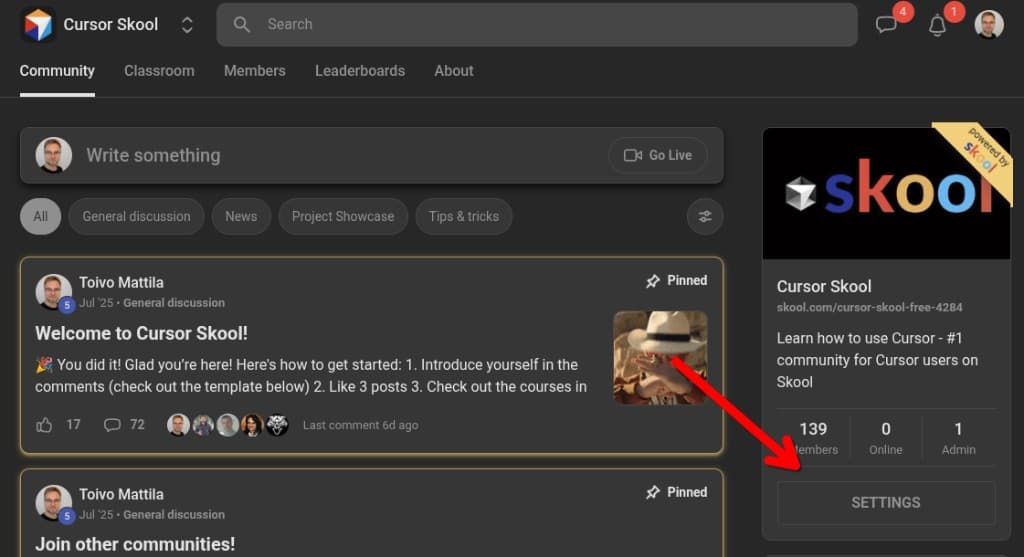
Start by navigating to your Skool community. Once inside, look for the Settings button. This is found in the right sidebar. Click on Settings to open the settings panel.
Navigate to the Discovery Tab
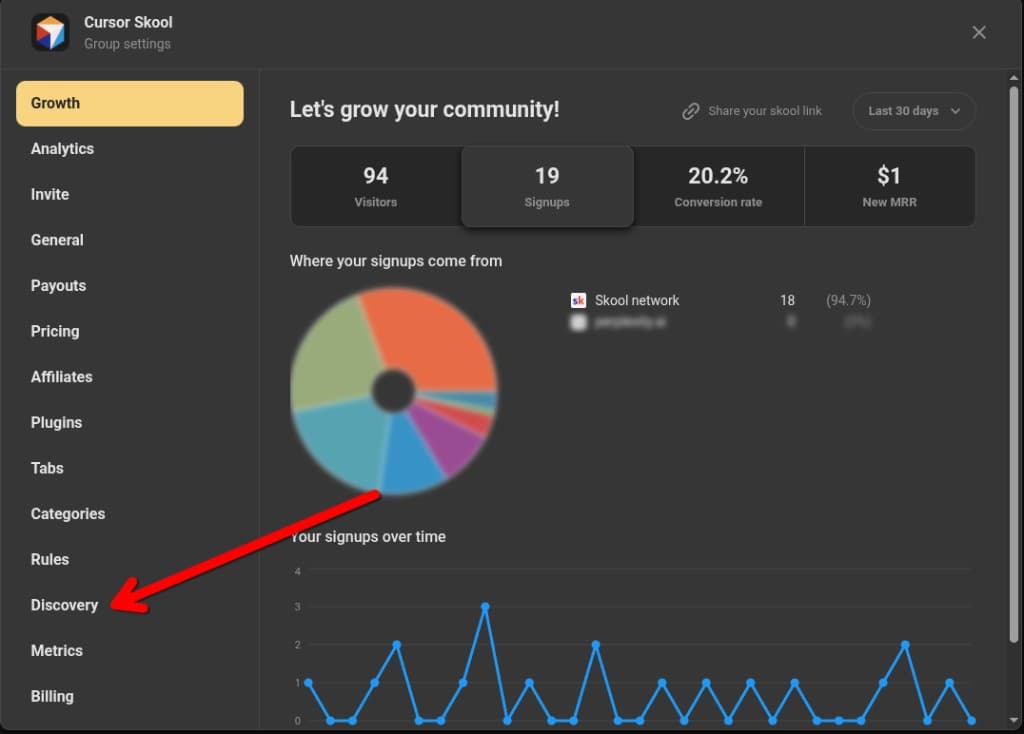
Within the Settings panel, look for navigation tabs on the left sidebar. Click on the Discovery tab. This section shows how your community appears in Skool's Discovery, and it is where your Discovery ranking information is displayed.
View Your Ranking Information
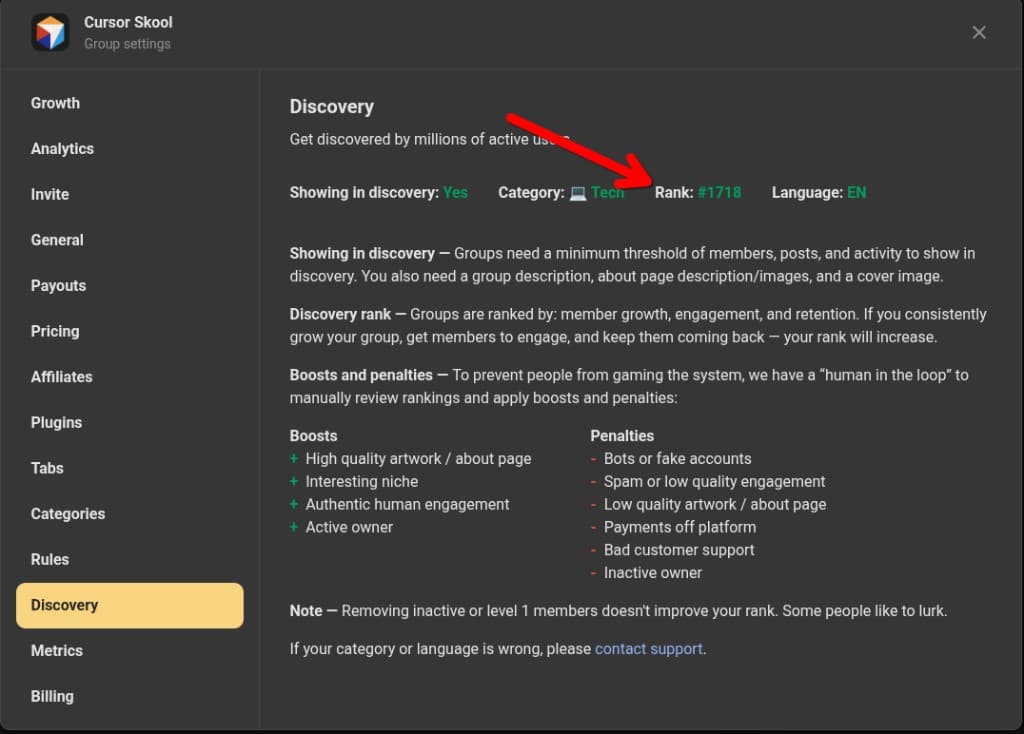
Once in the Discovery tab, you will see your community's current ranking displayed. This shows as a number (like #1, #5, #23) indicating your position for your category. The ranking reflects where your community appears in Skool's Discovery results relative to other communities in your category.
Tip: Take note of your current rank so you can track changes over time.
What If You Do Not See a Rank?
If your Discovery tab does not show a ranking, your community may not yet meet Skool's minimum eligibility requirements. Check that you have all of the following:
- ☐Minimum number of members (Skool requires a threshold of active members)
- ☐Active posts and ongoing activity in the community
- ☐Complete group description
- ☐About page with description and images
- ☐Cover image for your community
Once you hit these minimum thresholds, your group should become visible within two hours. If you still do not see a rank after meeting all requirements, your category or language settings may need review — contact Skool support for assistance.
Note: Removing inactive or level 1 members does not improve your rank. Some people prefer to lurk, and Skool accounts for this in their ranking algorithm.
Understanding Your Skool Community Ranking
Now that you have found your ranking, here is what it actually means. Your Skool community rank is a dynamic number that represents your position in Skool's Discovery algorithm. A rank of #1 means your community appears first when users search for your category or related keywords.
According to Skool's official documentation, groups are ranked primarily by three factors: member growth, engagement, and retention. If you consistently grow your group, get members to engage, and keep them coming back — your rank will increase over time.
Skool also employs a "human in the loop" review system to prevent gaming. Real humans manually review rankings and apply boosts and penalties. Positive boosts include high-quality artwork and about pages, interesting niches, authentic human engagement, and active owners. Penalties can occur for bots, spam, low-quality content, or inactive leadership.
Remember that rankings fluctuate regularly as new communities launch and existing ones grow. Do not be alarmed if your position changes from week to week — focus on the overall trend and continue building genuine engagement.
Summary
Finding your Skool community ranking is straightforward once you know where to look. By navigating to Community Settings → Discovery tab, you can view your current position and understand how visible your community is to potential members. Make it a habit to check your ranking regularly so you can track your community's growth and visibility over time.